
LazySkills
Mission control for agent skills.
A terminal UI for managing agent skills. One place to see what is installed, which agents can use each skill, why visibility may be broken, and what actions are safe to run next.


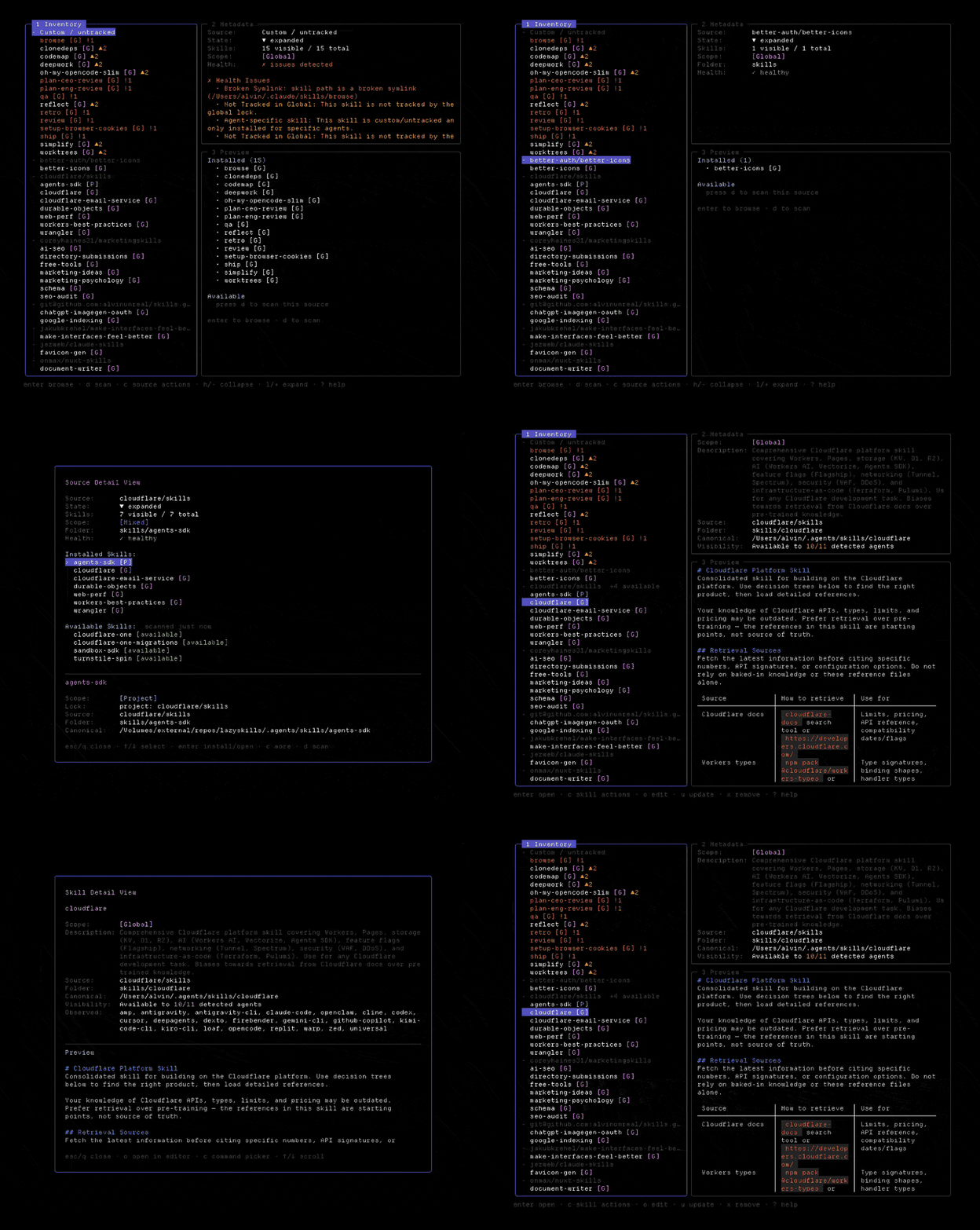
Features
- Consolidated Registry
- View every skill in your development environment inside a single, unified menu. Groups project, global, universal, and agent skills automatically.
- Cross-Agent Visibility
- Verify your agents can actually access your custom skills. Filter by target agent - Claude Code, Cursor, OpenCode, Codex, and Gemini - to see exactly what they see.
- Instant Diagnostic Checks
- Identify broken setups instantly. Highlights validation errors like missing SKILL.md instructions, dead symlinks, or orphaned locks.
- Safe Previews & Actions
- Preview actions before execution. Inspect parsed skill metadata, review formatted instructions, and execute updates, installs, or removals safely.
- Safe Skill Management
- Open, update, remove, or prune orphaned locks. Bulk update or clean up selected items safely with confirmation checks.
- Discover Sources
- Scan local paths or GitHub repositories to discover available skills you haven't installed yet, then bring them into your environment.
Install
Supported on macOS, Linux, and Windows. Once done, launch the TUI by typing lazyskills.
Getting Started
- 1.
Launch UI
Open your terminal in any repository containing agent visibility files, then run the launch command.
- 2.
Explore Sources
Start with the left pane which groups skills by source, so you can see where each is installed or cloned from.
- 3.
Manage with Keymap
Use single-key shortcuts to inspect details, run updates, filter by agent, or perform bulk removals safely.
Keymap
- /
- Search skillsInstantly filter skills in the current list by name or pattern.
- a
- Cycle agent filtersCycle through visibility filters for Claude Code, OpenCode, Cursor, Gemini, etc.
- f
- Toggle scopesFilter list between project, global, or all skill scopes.
- enter
- Open detailsShow metadata, documentation (SKILL.md), and configuration details.
- c
- Show actionsOpen menu of available commands for the selected skill.
- space
- Select for bulk actionsToggle selection state of multiple skills to batch update or remove.
- u
- Reinstall / UpdateRun build scripts, pull updates, or reinstall the selected skill.
- x
- Remove selectedUninstall and clean up references for the selected skill.
- ?
- Show full keymapToggle help window with full list of keybindings and descriptions.
Press ? inside the TUI at any time to open the full keymap.
Stargazer Giveaway
We designed physical high-quality LazySkills stickers. Star the repository on GitHub and you are automatically entered into a draw to win. We ship worldwide at no cost to you.

Winners are drawn from stargazers and announced in the sticker giveaway issue, tagged by their GitHub username. Shipping details are arranged privately.