
LazySkills
Mission control for agent skills
A terminal UI for managing agent skills. One place to see what is installed, which agents can use each skill, why visibility may be broken, and what actions are safe to run next.


Supported on macOS, Linux, and Windows. Once done, launch the TUI by typing lazyskills.
One TUI, 70 Agents
LazySkills knows where every agent looks for skills, per project and globally, and shows you exactly which agents can see each installed skill.
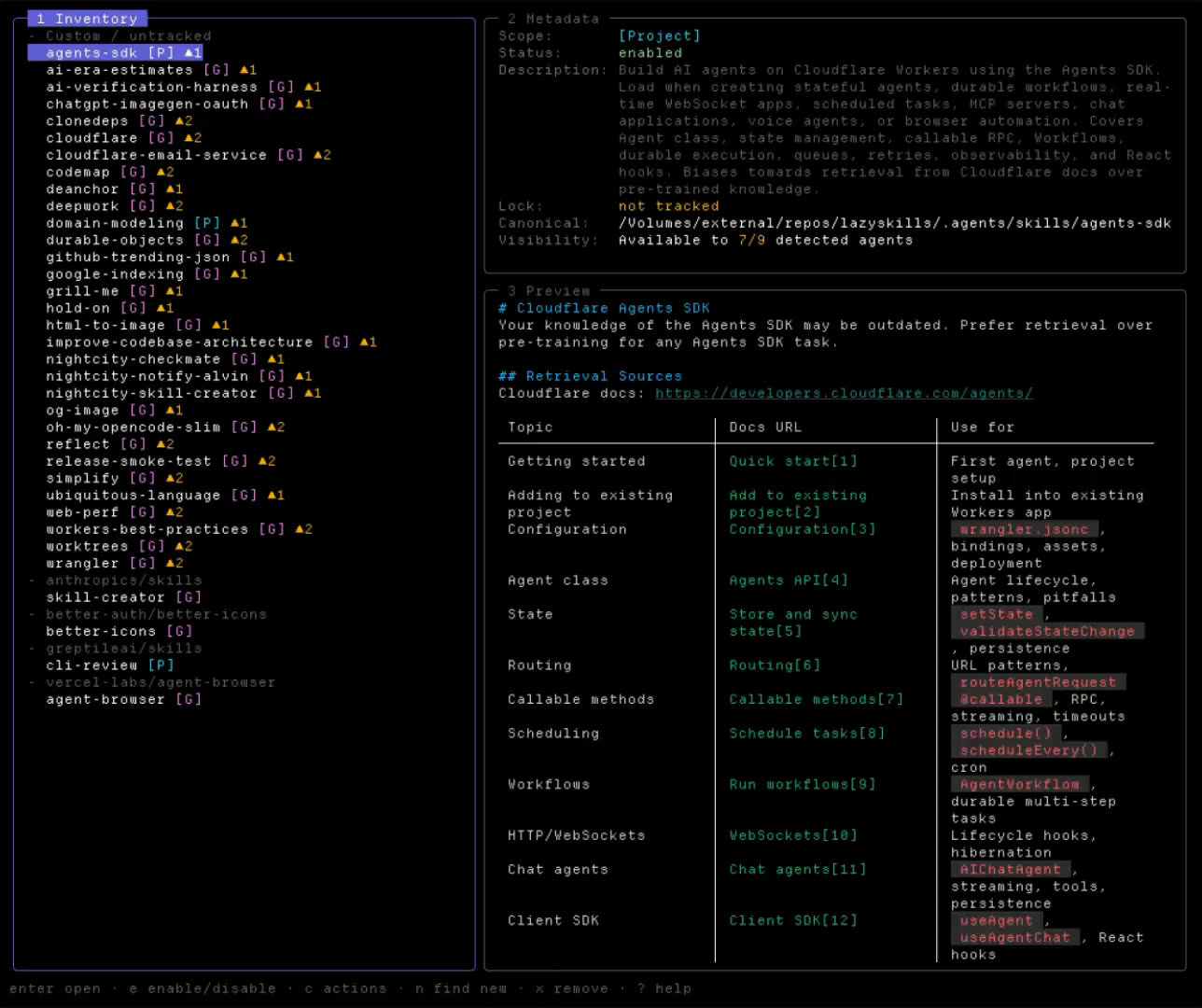
And this is what mission control looks like: every skill those agents can see, in one terminal screen.
Features
Every skill in one place
Project, global, universal, and agent-specific skills in a single TUI, grouped by the source they came from.
Agent visibility checks
Switch agents and see which skills are actually usable by Claude Code, OpenCode, Codex, Cursor, Gemini CLI, and many more.
Spot broken installs fast
Highlights missing SKILL.md files, invalid frontmatter, broken symlinks, missing lock entries, and ghost agent skills.
Preview before you act
Inspect metadata, rendered skill content, and the exact command LazySkills is about to run.
Safe skill actions
Open, reinstall, update, remove, prune orphaned locks, or run bulk actions with confirmation prompts.
Discover more from a source
Scan local checkouts or GitHub skill sources to find skills you have not installed yet.
Find and install new skills
Search skills.sh from inside LazySkills, preview the install command, then install to project or global scope.
Agent-friendly CLI mode
Registry search without opening the TUI: lazyskills find --json returns results any agent can parse.
Getting Started
Install LazySkills
One command with curl, Homebrew, Go, or PowerShell. Works on macOS, Linux, and Windows.
Launch it in a project
Type lazyskills in your terminal. The left pane groups every installed skill by its source.
Manage and discover
Check agent visibility, fix broken installs, and search skills.sh for new skills without leaving the TUI.
Keymap Reference
Command shortcuts available from anywhere inside the terminal app.
Press ? inside the TUI at any time to open the full interactive help screen.
Built for Agents Too
Everything the TUI knows is available as JSON, so your coding agent can search the registry and audit installed skills without a human at the keyboard.
Search the skills.sh registry, results as JSON.
Full snapshot of installed skills, sources, and agent visibility.
Check for a newer LazySkills release.
Stargazer Sticker Giveaway
We designed physical, high-quality LazySkills stickers. Star the repository on GitHub and you are automatically entered into a draw to win. We ship worldwide at no cost to you.

Winners are drawn from stargazers and announced in the sticker giveaway issue, tagged by their GitHub username. Shipping details are arranged privately.
Curated Skill Guides
Hand-picked skills by category, researched from real SKILL.md sources and registry install data.